
Tuya TRV603-WZ
| Model | TRV603-WZ |
| Vendor | Tuya |
| Description | Thermostatic radiator valve. |
| Exposes | battery, child_lock, window_detection, window_open, climate (current_heating_setpoint, local_temperature, local_temperature_calibration, system_mode, preset), comfort_temperature, eco_temperature, holiday_temperature, holiday_time, boost_heating, boost_time, frost_protection, schedule_monday, schedule_tuesday, schedule_wednesday, schedule_thursday, schedule_friday, schedule_saturday, schedule_sunday, screen_orientation, fault_code |
| Picture | 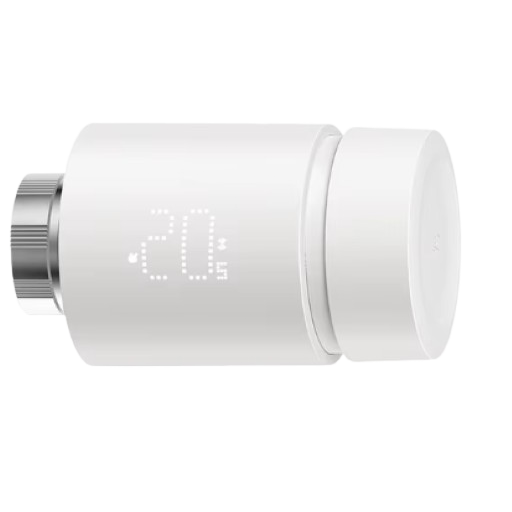 |
Options
How to use device type specific configuration
time_start: Reply to Tuya-specific time synchronization requests: "1970" - Reply with seconds since 1970/01/01 (recommended, should stop the device from asking), "2000" - Reply with seconds since 2000/01/01 (use if the weekday is wrong with 1970), "off" - Don't reply (use if replying causes too much traffic). Default for this device: "1970". The value must be one of1970,2000,off
Exposes
Battery (numeric)
Remaining battery in %, can take up to 24 hours before reported. Value can be found in the published state on the battery property. It's not possible to read (/get) or write (/set) this value. The minimal value is 0 and the maximum value is 100. The unit of this value is %.
Child lock (binary)
Enables/disables physical input on the device. Value can be found in the published state on the child_lock property. It's not possible to read (/get) this value. To write (/set) a value publish a message to topic zigbee2mqtt/FRIENDLY_NAME/set with payload {"child_lock": NEW_VALUE}. If value equals LOCK child lock is ON, if UNLOCK OFF.
Window detection (binary)
Enables/disables window detection on the device. Value can be found in the published state on the window_detection property. To read (/get) the value publish a message to topic zigbee2mqtt/FRIENDLY_NAME/get with payload {"window_detection": ""}. To write (/set) a value publish a message to topic zigbee2mqtt/FRIENDLY_NAME/set with payload {"window_detection": NEW_VALUE}. If value equals true window detection is ON, if false OFF.
Window open (binary)
Indicates if window is open. Value can be found in the published state on the window_open property. It's not possible to read (/get) or write (/set) this value. If value equals true window open is ON, if false OFF.
Climate
This climate device supports the following features: current_heating_setpoint, local_temperature, local_temperature_calibration, system_mode, preset.
current_heating_setpoint: Temperature setpoint. To control publish a message to topiczigbee2mqtt/FRIENDLY_NAME/setwith payload{"current_heating_setpoint": VALUE}whereVALUEis the °C between5and35. Reading (/get) this attribute is not possible.local_temperature: Current temperature measured on the device (in °C). Reading (/get) this attribute is not possible.system_mode: Mode of this device. To control publish a message to topiczigbee2mqtt/FRIENDLY_NAME/setwith payload{"system_mode": VALUE}whereVALUEis one of:auto,off. Reading (/get) this attribute is not possible.preset: Mode of this device (similar to system_mode). To control publish a message to topiczigbee2mqtt/FRIENDLY_NAME/setwith payload{"preset": VALUE}whereVALUEis one of:schedule,manual,holiday. Reading (/get) this attribute is not possible.local_temperature_calibration: Offset to add/subtract to the local temperature. To control publish a message to topiczigbee2mqtt/FRIENDLY_NAME/setwith payload{"local_temperature_calibration": VALUE}.The minimal value is-7and the maximum value is7with a step size of0.5.
Comfort temperature (numeric)
Comfort temperature. Value can be found in the published state on the comfort_temperature property. It's not possible to read (/get) this value. To write (/set) a value publish a message to topic zigbee2mqtt/FRIENDLY_NAME/set with payload {"comfort_temperature": NEW_VALUE}. The minimal value is 15 and the maximum value is 35. The unit of this value is °C.
Eco temperature (numeric)
Eco temperature. Value can be found in the published state on the eco_temperature property. It's not possible to read (/get) this value. To write (/set) a value publish a message to topic zigbee2mqtt/FRIENDLY_NAME/set with payload {"eco_temperature": NEW_VALUE}. The minimal value is 5 and the maximum value is 22. The unit of this value is °C.
Holiday temperature (numeric)
Holiday temperature. Value can be found in the published state on the holiday_temperature property. It's not possible to read (/get) this value. To write (/set) a value publish a message to topic zigbee2mqtt/FRIENDLY_NAME/set with payload {"holiday_temperature": NEW_VALUE}. The minimal value is 5 and the maximum value is 35. The unit of this value is °C.
Holiday time (text)
Holiday start and end time in format YYYY/MM/DD HH:MM | YYYY/MM/DD HH:MM. Value can be found in the published state on the holiday_time property. It's not possible to read (/get) this value. To write (/set) a value publish a message to topic zigbee2mqtt/FRIENDLY_NAME/set with payload {"holiday_time": NEW_VALUE}.
Boost heating (binary)
Value can be found in the published state on the boost_heating property. It's not possible to read (/get) this value. To write (/set) a value publish a message to topic zigbee2mqtt/FRIENDLY_NAME/set with payload {"boost_heating": NEW_VALUE}. If value equals ON boost heating is ON, if OFF OFF.
Boost time (numeric)
Countdown in minutes. Value can be found in the published state on the boost_time property. It's not possible to read (/get) this value. To write (/set) a value publish a message to topic zigbee2mqtt/FRIENDLY_NAME/set with payload {"boost_time": NEW_VALUE}. The minimal value is 0 and the maximum value is 30. The unit of this value is min.
Frost protection (binary)
When the room temperature is lower than 5 °C, the valve opens; when the temperature rises to 8 °C, the valve closes.. Value can be found in the published state on the frost_protection property. It's not possible to read (/get) this value. To write (/set) a value publish a message to topic zigbee2mqtt/FRIENDLY_NAME/set with payload {"frost_protection": NEW_VALUE}. If value equals ON frost protection is ON, if OFF OFF.
Schedule monday (text)
Schedule in 8 segments format: HH:MM/TT.T HH:MM/TT.T .... Value can be found in the published state on the schedule_monday property. It's not possible to read (/get) this value. To write (/set) a value publish a message to topic zigbee2mqtt/FRIENDLY_NAME/set with payload {"schedule_monday": NEW_VALUE}.
Schedule tuesday (text)
Schedule in 8 segments format: HH:MM/TT.T HH:MM/TT.T .... Value can be found in the published state on the schedule_tuesday property. It's not possible to read (/get) this value. To write (/set) a value publish a message to topic zigbee2mqtt/FRIENDLY_NAME/set with payload {"schedule_tuesday": NEW_VALUE}.
Schedule wednesday (text)
Schedule in 8 segments format: HH:MM/TT.T HH:MM/TT.T .... Value can be found in the published state on the schedule_wednesday property. It's not possible to read (/get) this value. To write (/set) a value publish a message to topic zigbee2mqtt/FRIENDLY_NAME/set with payload {"schedule_wednesday": NEW_VALUE}.
Schedule thursday (text)
Schedule in 8 segments format: HH:MM/TT.T HH:MM/TT.T .... Value can be found in the published state on the schedule_thursday property. It's not possible to read (/get) this value. To write (/set) a value publish a message to topic zigbee2mqtt/FRIENDLY_NAME/set with payload {"schedule_thursday": NEW_VALUE}.
Schedule friday (text)
Schedule in 8 segments format: HH:MM/TT.T HH:MM/TT.T .... Value can be found in the published state on the schedule_friday property. It's not possible to read (/get) this value. To write (/set) a value publish a message to topic zigbee2mqtt/FRIENDLY_NAME/set with payload {"schedule_friday": NEW_VALUE}.
Schedule saturday (text)
Schedule in 8 segments format: HH:MM/TT.T HH:MM/TT.T .... Value can be found in the published state on the schedule_saturday property. It's not possible to read (/get) this value. To write (/set) a value publish a message to topic zigbee2mqtt/FRIENDLY_NAME/set with payload {"schedule_saturday": NEW_VALUE}.
Schedule sunday (text)
Schedule in 8 segments format: HH:MM/TT.T HH:MM/TT.T .... Value can be found in the published state on the schedule_sunday property. It's not possible to read (/get) this value. To write (/set) a value publish a message to topic zigbee2mqtt/FRIENDLY_NAME/set with payload {"schedule_sunday": NEW_VALUE}.
Screen orientation (enum)
Screen orientation. Value can be found in the published state on the screen_orientation property. It's not possible to read (/get) this value. To write (/set) a value publish a message to topic zigbee2mqtt/FRIENDLY_NAME/set with payload {"screen_orientation": NEW_VALUE}. The possible values are: up, right, down, left.
Fault code (numeric)
Raw fault code. Value can be found in the published state on the fault_code property. It's not possible to read (/get) or write (/set) this value.